SmartThings
- 4.6
- Rating
- 1.00B
- Installs
- Free
- Price

 Analysis by App-foxy
I use SmartThings as the control center for Samsung devices in my home, and its biggest strength is that it tries to turn a collection of separate products into one everyday routine. Instead of opening one app for a television, another for an appliance, and a remote for something else, I can often start with one place and see what is connected. That sounds simple, but the convenience becomes much more noticeable when several devices are used together.
SmartThings is a free lifestyle app from Samsung Electronics Co., Ltd. It is available for everyone and has grown into a very widely used part of Samsung’s connected-device ecosystem, with more than a billion installs and an average rating of 4.6 from roughly four and a half million ratings. Those figures do not automatically make it perfect, but they do reflect how useful it can be for people who already own compatible Samsung equipment.
How SmartThings feels in current everyday use
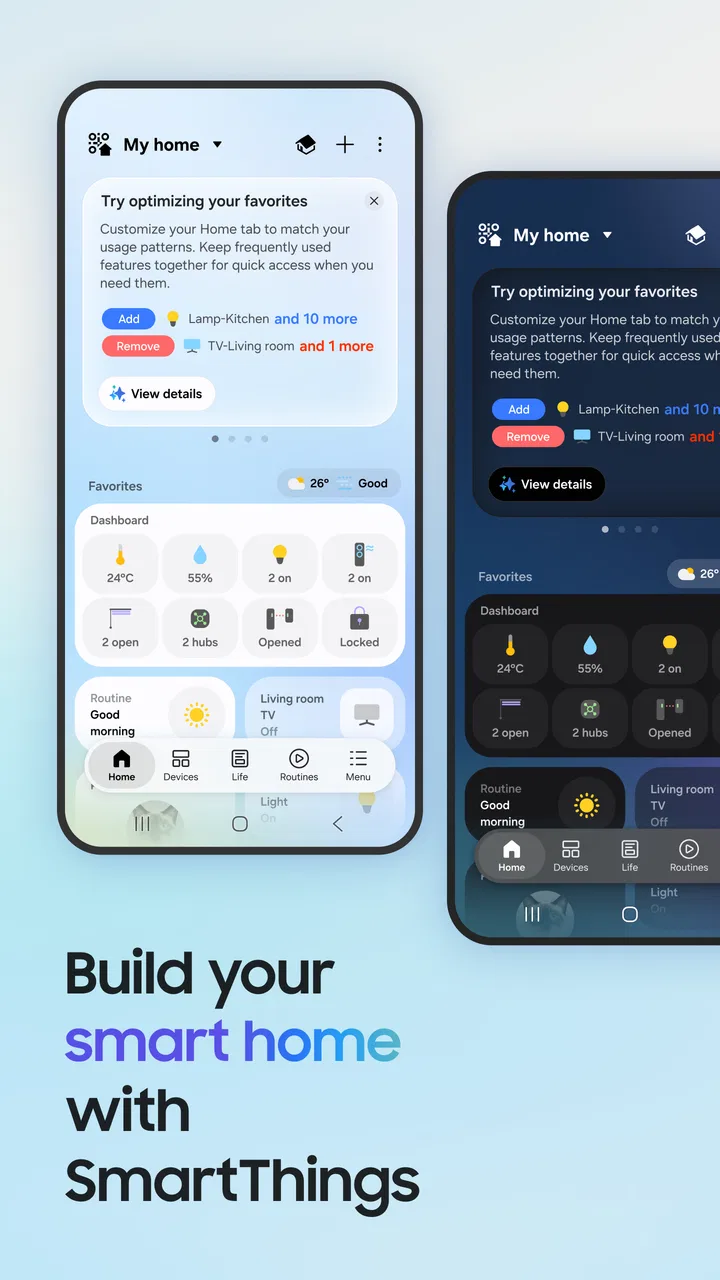
The first thing I noticed is that SmartThings is more useful when I treat it as a home dashboard rather than just a remote control. Its role covers Samsung Smart TVs, appliances, and other devices that work with SmartThings. The app can bring these products into a shared environment, so the experience is less about remembering which control belongs to which device and more about checking the state of the home from one screen.
In-Depth Coverage of SmartThings
For example, I can imagine a typical evening workflow: the television is on in the living room, an appliance is running in the kitchen, and I want to check what is happening without walking from room to room. SmartThings is designed for that kind of glanceable control. The practical benefit is not that every action becomes automatic; it is that the app reduces the small interruptions that normally come with managing connected devices.
The interface makes the most sense after I organize devices by rooms or by the way I use them. A television, kitchen appliance, and other compatible products can otherwise feel like a long technical inventory. Grouping them around real spaces or routines makes the app easier to understand, especially for someone who is not interested in home automation as a hobby.
The best reason to install SmartThings is not owning one connected product; it is having several Samsung or compatible devices that need to work together. With only a single television, the app may still be handy, but its value is narrower. With multiple devices, the unified view becomes much more convincing.
Getting started without turning the home into a project
Setup is generally approachable, but it is not entirely effortless. I would begin by signing in, allowing the app to look for supported devices, and adding products one at a time. The exact experience depends on the device, its connection, and whether it is designed to work with SmartThings, so I would not expect every appliance in a home to appear automatically.
One useful habit is to add the most important device first, then test a basic action before adding everything else. If the television responds correctly, I know the account and network are behaving as expected. After that, adding appliances individually makes it easier to identify where a problem lies. This is more reliable than trying to connect a whole home at once and then wondering which product caused the confusion.
I also recommend using clear names. “TV” may be fine in a small apartment, but “Living room TV” is better if there is more than one screen. The same applies to appliances. A descriptive label saves time later, particularly when voice control or routines are involved. This is a small configuration choice, but it has a larger effect on daily usability than many people expect.
What the app does well for Samsung households
SmartThings is strongest when it keeps common actions close at hand. A phone can become a convenient way to check or control compatible equipment without searching for a physical remote. That is especially useful when the remote is misplaced, when someone wants to manage a device from another room, or when the household shares access to the same set of products.
The app also helps make connected appliances feel less isolated. A smart television is no longer treated as an entirely separate product from the rest of the home, and compatible appliances can be viewed through the same general system. I like this approach because it gives the home a consistent control layer instead of forcing me to learn a different layout for every manufacturer.
Another strength is the possibility of building routines around repeated situations. I would use a routine for a predictable moment, such as preparing the home for an evening or leaving the house, rather than trying to automate every minor action. The best routines remove several small steps at once. The worst ones are overcomplicated and become another thing to maintain.
This is also where SmartThings differs from a basic remote-control app. A remote focuses on one product at a time. SmartThings is more useful when the desired result involves a room, a schedule, or several compatible devices. That broader scope is its main advantage, but it also means the setup requires more thought.
Three practical techniques that improve the experience
My first tip is to create a small number of meaningful rooms and routines instead of filling the app with every possible category. A routine called “Movie time” or “Leaving home” is easier to remember than a collection of narrowly defined commands. If a routine stops being useful, I would remove it rather than allowing old experiments to clutter the dashboard.
My second tip is to use the app as a status check before using it as a control tool. When an appliance or television does not respond, checking whether it appears connected can save repeated taps. This separates a command problem from a connection problem. It also prevents the common mistake of assuming that pressing a button again will fix a device that is temporarily unavailable.
You May Also Like

 Blood Strike: 2.5 Anniversary
Blood Strike’s Loadouts Turn Every Drop Into a Tactical Gamble
A close look at Blood Strike’s custom loadouts: how fast access to signature weapons reshapes its battle royale rhythm, rewards preparation, and narrows the gap between fights.

 Pandora - Music & Podcasts
Pandora’s Music Is Easy to Start, but Harder to Recover
Pandora’s strength is its low-effort path from a seed to a station. Its weak spot is how much confidence it asks you to place in connection, setup, and quiet recovery.

 8 Ball Pool
8 Ball Pool Is Built on Rivalries, Rematches, and Routine
A close look at the rivalries, rematches, shared routines, and unanswered safety questions that turn a quick pool match into a persistent mobile community.

 Samsung Music
Samsung Music’s Quiet Strength Is Playing What You Already Own
Its reach comes less from spectacle than from dependable access to a personal library. That simplicity is both the app’s strongest retention engine and its ceiling.

 AccuWeather: Weather Radar
AccuWeather Review: A Quick, Clear Forecast for Everyday Decisions
For everyday plans, the best forecast is the one you can understand quickly. AccuWeather makes rain timing, radar, and local conditions easy to act on, with a few trade-offs.

 Hill Climb Racing
Why Hill Climb Racing Still Turns Crashes Into One More Run
A tiny car, a bumpy hill and one more upgrade: Hill Climb Racing keeps resurfacing because its simple chaos makes every near-miss feel personal.
More From Our News Desk



My third tip is to keep manual controls available. Automation is convenient, but real homes are unpredictable. A guest may want a different television setting, a routine may run at an inconvenient moment, or an appliance may need attention before its normal schedule. I get better results when routines handle predictable work while manual controls remain easy to reach.
How the product has developed
SmartThings was released on April 17, 2017, and its continued presence shows how the idea of a connected-home hub has moved from a novelty toward a normal part of Samsung’s device experience. I see its evolution less as a single dramatic change and more as an expansion of responsibility: it is expected to connect televisions, appliances, and compatible products in a way that feels approachable to ordinary households.
The important change for existing users is the broader role of the app. Someone who first installed it for television control may later find it useful for appliances or other supported devices. That growth can make the app more valuable over time, but it can also make the interface feel busier. A tool that begins as a simple remote can become a home-management dashboard, and those two purposes do not always need the same layout.
For that reason, I judge SmartThings by how well it balances discovery with clarity. New device support and wider compatibility are useful only if the everyday controls remain easy to find. I would rather have a smaller, well-organized dashboard than a crowded screen full of options I rarely use.
What existing users should expect after expanding their setup
If you already use SmartThings with one Samsung product, adding another compatible device can make the app feel substantially more worthwhile. The main adjustment is organizational: names, rooms, permissions within the household, and routines become more important as the number of devices grows. A setup that feels effortless with one product may need a little maintenance once several products share the same account.
I would also expect occasional friction around compatibility. “Smart” does not mean that every device from every brand will offer the same controls, and even compatible products may expose different options. A television can provide a richer control experience than an appliance, while another product may mainly show status or offer a limited set of commands. That unevenness is normal for a platform that brings different kinds of hardware together, but it is worth remembering before buying a device solely for integration.
For families, the practical question is who will use the app and how. If everyone relies on a single account or shared phone, SmartThings can feel straightforward. If several people need independent access, the household should decide who manages routines and device names. Clear ownership avoids accidental changes and keeps the system understandable for less technical users.
Where SmartThings still has limits
The biggest limitation is dependence on compatible hardware. SmartThings cannot turn an ordinary television or appliance into a fully integrated device simply because the app is installed. Before relying on it, I would check whether the exact model is supported and what kind of control it offers. This matters more than the app’s general reputation.
There is also a difference between controlling a device and replacing every original control method. I would not throw away physical remotes or assume the phone is always the fastest option. A remote can be quicker for a familiar television action, while the app is better for checking devices, coordinating several products, or handling situations where the remote is not nearby.
Another weakness is that automation can become fragile when the household changes. A renamed device, a replaced router, or a product that temporarily disconnects can affect a routine. The app is most dependable when routines are simple and easy to test. Complex chains may look impressive during setup but can be frustrating when one step fails and the result is unclear.
SmartThings is also not the right choice for someone who wants a completely brand-neutral smart-home system without any attachment to Samsung’s ecosystem. A different platform may be preferable if your devices come from many manufacturers and your priority is a single, consistent control philosophy across all of them. SmartThings makes the most sense when Samsung products are already central to the home.
Questions I would ask before installing it
The first question is whether the app costs anything to try. SmartThings is free, so the decision is mainly about compatibility and usefulness rather than an upfront purchase. Of course, connected hardware is a separate matter, but the app itself does not require a paid download.
The second question is whether it works only with Samsung products. Samsung devices are clearly its natural home, but the app is also intended for SmartThings-compatible devices. I would still verify each model individually, because compatibility is more useful when the specific product supports the controls you actually need.
The third question is whether it replaces a television remote. It can provide convenient television control, but I would view it as an additional control option rather than a universal replacement. The physical remote may remain faster for frequent actions, while SmartThings is more valuable for combining television control with the rest of the home.
The fourth question is whether a nontechnical family member can use it. Yes, but only after the setup is organized. Clear device names, sensible rooms, and a restrained number of routines make a big difference. If the dashboard is left in its default, cluttered state, the app can feel more complicated than it needs to be.
The fifth question is whether it is worth keeping after the initial setup. In my experience, the answer depends on how often you use connected devices together. If SmartThings only duplicates a remote you always have nearby, it may not earn a permanent place on your phone. If it helps you check appliances, manage a television, and run a few useful routines, it becomes much easier to justify.
What I would watch as the platform continues
As SmartThings continues to develop, I would pay attention to how it handles the tension between more capabilities and a simpler daily experience. A growing device ecosystem is helpful, but users should not have to search through technical menus to perform basic actions. Better organization, clearer device states, and dependable routines matter as much as adding another category of hardware.
I would also watch how well the app serves households that mix Samsung products with compatible devices from elsewhere. That is where a connected-home platform proves whether it is genuinely flexible or mainly an extension of one manufacturer’s lineup. The more varied the home, the more important consistent naming, status information, and dependable automation become.
For someone starting from scratch, I would not recommend installing SmartThings first and buying devices later without checking compatibility. I would choose the products that fit the home, confirm that they work with the platform, and then use the app to bring them together. That approach avoids building a routine around a device that cannot participate in it properly.
Overall, SmartThings is a capable lifestyle app for people who want Samsung Smart TVs, appliances, and compatible connected devices in one place. I like it most as a practical home dashboard: useful for status checks, shared control, and a few carefully chosen routines. Its free price and everyone-friendly rating make it easy to try, while its large installed base suggests that many households find a role for it.
I would recommend it to Samsung users with more than one compatible device, especially those who want to reduce small daily chores rather than build an elaborate automation system. I would skip it if I owned no supported hardware, preferred a completely brand-neutral platform, or only needed a simple television remote. Used with realistic expectations and a tidy setup, SmartThings can quietly make a connected home easier to live with, which is a more valuable result than a long list of unused features.
FAQs for SmartThings
01What is SmartThings and how does it work?
SmartThings is a versatile app that allows you to connect and control multiple smart devices in your home through one interface. It works by integrating with compatible devices like lights, cameras, thermostats, and more, enabling you to automate routines and monitor your home from anywhere using your smartphone.
02Which devices are compatible with SmartThings?
SmartThings supports a wide range of devices from various manufacturers. These include Samsung devices, Philips Hue lights, Nest thermostats, Ring cameras, and many more. The app’s compatibility list is extensive, so it’s advisable to check the official SmartThings website or app for the latest supported devices.
03Is SmartThings easy to set up for beginners?
Yes, SmartThings is designed with user-friendliness in mind. The setup process involves downloading the app, creating an account, and connecting your smart devices. The app guides you through each step with on-screen instructions, making it accessible even for those new to smart home technology.
04Does SmartThings require any additional hardware?
While the SmartThings app itself does not require additional hardware, some devices may need a hub to connect. The SmartThings Hub can enhance connectivity for certain devices, especially those using Zigbee or Z-Wave protocols. However, many Wi-Fi-enabled devices can connect directly to the app without a hub.
05How secure is the SmartThings app?
SmartThings prioritizes user security by employing encryption and secure protocols. The app requires user authentication and offers features like two-factor authentication for enhanced security. Samsung continuously updates the app to address potential vulnerabilities, ensuring that your smart home remains protected.
Pros
- Seamless integration with Samsung devices.
- User-friendly interface for beginners.
- Supports a wide range of smart devices.
- Custom automation for personalized control.
- Voice control via Bixby
- Alexa
- Google.
Cons
- Limited features on non-Samsung devices.
- Occasional connectivity issues reported.
- Some features require a Samsung account.
- Advanced settings can be complex.
- Frequent updates may disrupt functionality.

SmartThings
Gallery